Speak to an Expert Today!

714-639-3326
sales@decotechgroup.com

Headquarters

1040 Segovia Circle
Placentia, CA 92870

Pad Printing Pad Selection Tool · Made in Southern California

Silicone Pad Finder

Find the Right Pad Printing Pad for Your Application

Enter your artwork size, describe the part surface and choose the production need. Deco Tech’s Pad Finder compares suitable silicone pad printing pads by recommended print area, pad shape, Shore 00 durometer and silicone formulation.

100% manufactured in the USAPad manufacturing since 1997193 numbered standard pad modelsCustom pads availableDuraPro™ · Stat-X™ · Printz™
DuraPro, Stat-X and Printz silicone pads presented in the updated premium product style
DuraPro™ · Stat-X™ · Printz™
Guided pad selection

Find Silicone Pad Printing Pads by Artwork Size

One question appears at a time. Enter the printed image size, describe the part surface and choose the production priority to compare the closest verified pad matches.

193 standard catalog models58 Round · 73 Square · 27 Loaf · 35 V-shaped

The recommendation engine compares published recommended print areas across Deco Tech’s standard pad families. Models without a published print-area specification remain available through exact model search.

Search any current R001–R058, S001–S073, L001–L027 or V001–V035 model.

1Artwork size
2Part surface
3Production need
1

How is the printed image measured?

Choose a round diameter or enter the maximum width and height of the complete printed image.

Width × height range: enter at least 0.1 mm and no more than 380 mm per dimension. The finder checks both orientations. Round-pad matches use the artwork diagonal.
Already know the pad shape?Skip the finder and open a shape catalog.Open shape catalogsClose catalogs
Optional fine-tuning
Need help choosing hardness or silicone formulation?Open this guide after you have narrowed the pad shape and size.
Open hardness guideClose guide
1
Match pad hardness to the partUse softer pads for conformity and firmer pads for stability.
Pad hardness

Match pad hardness to the part.

Pad hardness changes how the pad compresses, conforms and releases the image. Firmer pads provide more stability on flat, accessible surfaces, while softer pads conform more easily to curved, textured or irregular parts. The goal is to select the firmness that reaches the print area cleanly without excessive pressure or image distortion.

Deco Tech’s current ordering code identifies hardness in Shore 00 bands. The letter appears inside the pad part number.

Read the complete pad-selection guide
Softer / more conformingHarder / more stable
O20–25 Shore 00
B30–35 Shore 00
G40–45 Shore 00
Y50–55 Shore 00
R60–65 Shore 00
SoftCurved, textured or irregular surfaces; restricted areas where conformity matters.
MediumA practical test range for many jobs when the part is neither extremely flat nor highly irregular.
HardFlat, smooth and accessible parts where stability and fine detail are the priority.

The durometer code is only one part of the selection. Pad shape, mass, height and angle also change how a pad behaves under compression.

2
Choose the silicone formulationDuraPro™, Stat-X™ or Printz™ based on the production need.
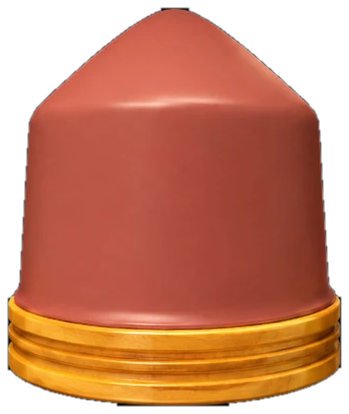
DuraPro silicone pad in the updated premium product style

DuraPro™

Deco Tech’s durable general-purpose formulation for industrial printing on plastics, metals and coated parts. It is the broadest starting point for regular production.

Consider it for: durability, repeatability and high-volume general use.
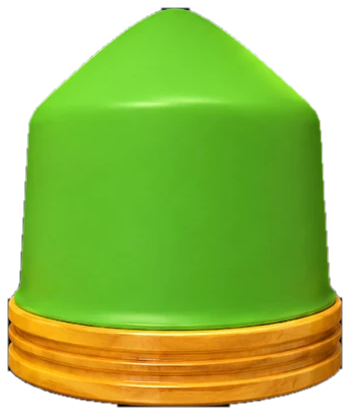
Stat-X silicone pad in the updated premium product style

Stat-X™

An anti-static formulation for applications where charge buildup attracts dust, creates ink spider-webbing or risks sensitive electronic components.

Consider it for: lenses, electronics and static-sensitive surfaces.
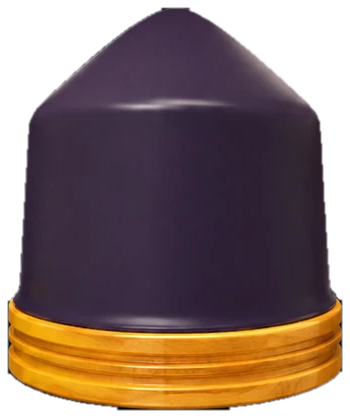
Printz silicone pad in the updated premium product style

Printz™

A cost-conscious silicone formulation with a distinctive purple body, intended for customers seeking dependable general pad performance at a lower price point.

Consider it for: routine jobs where value is a leading concern.
Application review

Need Help Choosing a Pad Printing Pad?

A photograph alone is rarely enough to select a pad. The more information we have about the machine, artwork, part and available clearance, the faster we can narrow the options or determine whether custom tooling is needed.

Deco Tech Pad Support

Call 714-639-DECO or email the application details to sales@decotechgroup.com.

Start an Email
Application checklist

The information we need to recommend a pad.

Send what you have. We can help identify the missing details before a pad is quoted.

Machine type and model
Ink cup and/or cliché dimensions
Part size and description
Substrate material
Part drawing or physical samples
Surface texture and nearby obstructions
Artwork file and printed image size
Production rate and quality concerns
Pad selection FAQ

Silicone Pad Printing Pad Selection FAQs

How do I choose a silicone pad for pad printing?

Start with the complete printed image size, then evaluate the part geometry, pad shape, available machine clearance, Shore 00 hardness and silicone formulation. The pad must cover the artwork and roll across the image without excessive distortion.

Can I choose a pad from shape alone?

No. Shape is a useful first filter, but the final selection also depends on artwork size, part geometry, pad compression, machine clearance, hardness and how the ink releases from the pad.

Should I use a larger or smaller pad printing pad?

Use the largest practical pad your machine clearance and compression capability allow. Larger pads generally deform less and can reduce image distortion, but the machine still needs enough force and clearance to compress the pad correctly.

Does the pad number indicate its size?

No. Deco Tech assigns mold numbers consecutively. The number identifies a specific pad design, but it does not tell you whether that pad is larger or smaller than another model.

Can Deco Tech make a custom pad?

Yes. Custom pad tooling is available when a standard shape cannot reach the image area, clear an obstruction or compress correctly on the part.

Should I always use the hardest pad possible?

Use the firmest pad that can print the surface correctly without excessive pressure or distortion. Hard pads offer stability; softer pads provide more conformity. Testing determines the right balance.

What should I send for a recommendation?

Send the machine model, cliché or ink-cup size, part dimensions, substrate, artwork, surface description and a drawing or sample part when available.

Pad printing pad numbers

Already Know Your Deco Tech Pad Number?

Open this section to decode an existing number or build a complete number with hardness, base, mounting and special-option codes.

Open the pad-number decoder and ordering referenceFor repeat orders and customers who already know the mold family.
Pad part numbers

Every code describes part of the finished pad.

Type an existing part number to decode it, or use the ordering builder below to create a valid configuration one step at a time.

Example: R001-YWS-G identifies a round pad, mold 001, yellow durometer, standard wood base, standard 3/8-16 insert, and a high-gloss surface.
How R001-YWS-G is built
RShape familyRound
001Mold numberSequential ID
YDurometerYellow · 50–55
WBase typeStandard wood
SInsert3/8-16 standard
GSpecial codeHigh-gloss surface

The position of each letter matters. For example, S at the beginning means a square pad family; S in the insert position means a standard 3/8-16 insert.

Complete ordering reference

Base and insert options should not be an afterthought.

The base determines how the pad is supported. The insert or tapped-hole code determines how it mounts to the machine or pad holder. They are separate choices and both appear in the finished part number.

Interactive ordering builder

Click the options below and build the part number as you go.

Choose the shape family, enter the mold number, then select hardness, base, insert and any special code. The builder updates live and keeps the correct part-number structure visible.

Current part number
R001-YWS-G
Round · Yellow hardness · Standard wood base · 3/8-16 insert · High-gloss surface
1Pad shape prefixFirst letter

The first letter identifies the pad-shape family. It does not identify the pad size.

2Pad mold numberThree digits
Use the exact mold number from the product page. Higher numbers do not indicate larger pads.
Type one to three digits. The builder formats the number to three digits without interrupting your typing.

Pad numbers are assigned consecutively as new molds are created. A higher number does not mean a larger pad.

001Identifies the mold within that shape family. Confirm dimensions on the individual product page.
3Durometer color codeShore 00 hardness

The hardness letter is color-coded. The ordering guide shows these hardness ranges for DuraPro™, Stat-X™, and Printz™ formulations; final availability should still be confirmed for the selected mold.

CodeColorDurometerGeneral behavior
OOrange20–25 Shore 00Softest · maximum conformity
BBlue30–35 Shore 00Soft · curved or irregular areas
GGreen40–45 Shore 00Medium · common starting range
YYellow50–55 Shore 00Firm · added stability
RRed60–65 Shore 00Hardest · flat, accessible surfaces
4Base type codePad support

Choose the base material and thickness required by the pad holder and machine clearance. Aluminum bases A, B and C are tapped directly. Wood bases W, X and Y can use an insert or no insert.

Mounting rule: aluminum base = T only. Wood base = N, M, S or Q.
5Insert or tapped-hole codeMounting connection
Standard wood base selected: choose N, M, S or Q.

The mounting code depends on the base. Aluminum bases A, B and C must use T because the aluminum is tapped directly; inserts are not installed in aluminum. Wood bases W, X and Y can use N, M, S or Q.

Current mounting rule: Wood bases allow N, M, S or Q. Aluminum bases automatically select T and disable the insert choices.
6Special codesSurface or formulation
GHigh-gloss surfaceSurface option added to the selected formulation.
PPrintz™Purple silicone formulation.
XStat-X™Green anti-static silicone formulation.
DuraPro™No special formulation extension is used for the standard DuraPro series.
Review your selection

Your built part number is ready above.

Use the matching shape catalog to confirm the mold dimensions. If the exact mold, mounting method or hardness is uncertain, email the selection to Deco Tech before ordering.

Return to the live selection